Терминалы и SSH
Подключения по паролю, ключу или через SSH-агент. Работа через промежуточный сервер с ProxyJump и настройка туннелей.
SSH · ProxyJump · ТуннелиSEREIN / САЙТ ПРОДУКТА
Рабочее пространство для управления серверами.
ЧТО ЭТО
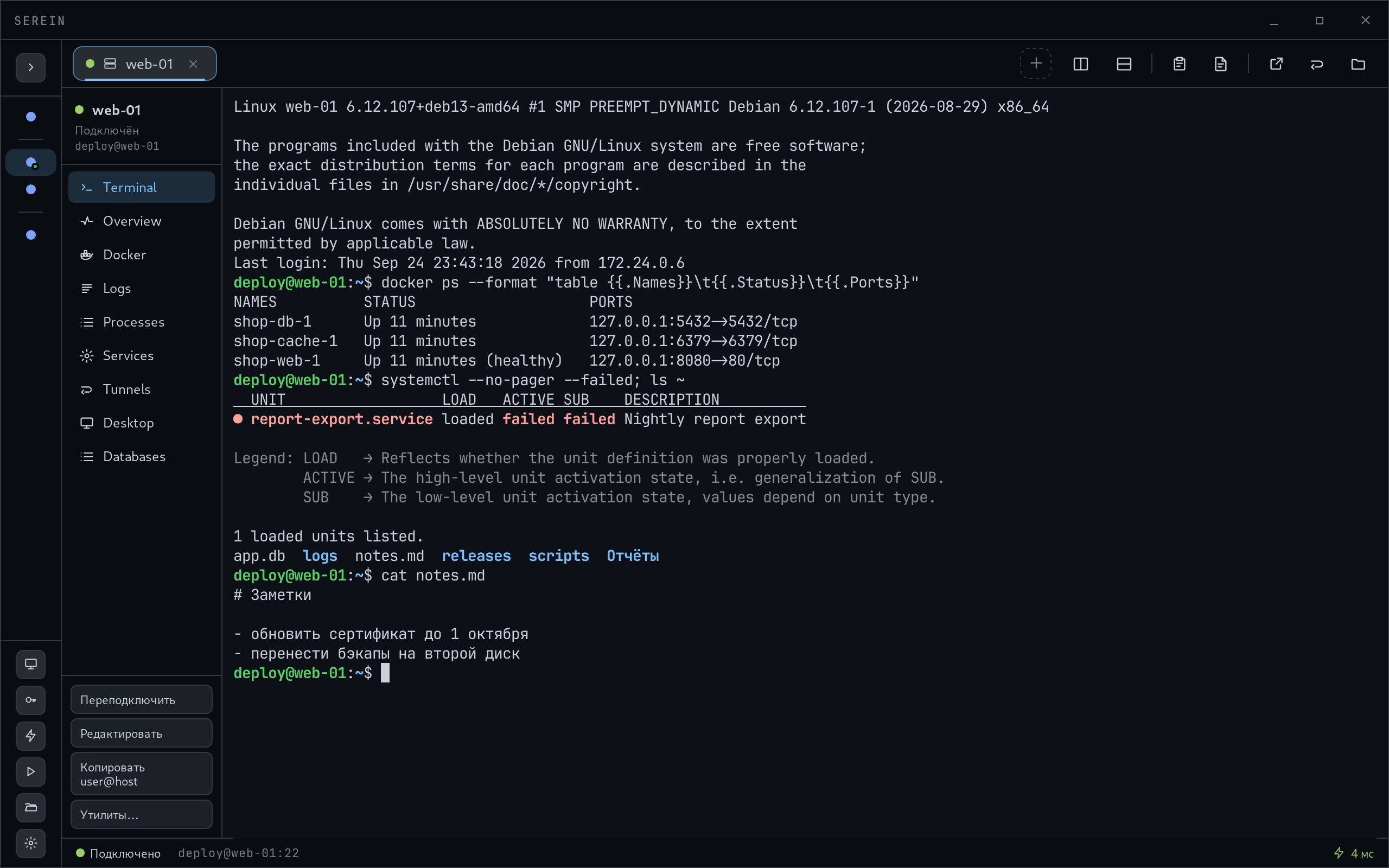
Serein — настольное приложение, которое объединяет терминалы, файлы, контейнеры, базы данных и удалённые рабочие столы.
Познакомиться с SereinSEREIN / О ПРОДУКТЕ
Подключайтесь к серверу, работайте с файлами, контейнерами, базами данных и удалёнными рабочими столами из Serein.
Перейти к загрузкамПодключения по паролю, ключу или через SSH-агент. Работа через промежуточный сервер с ProxyJump и настройка туннелей.
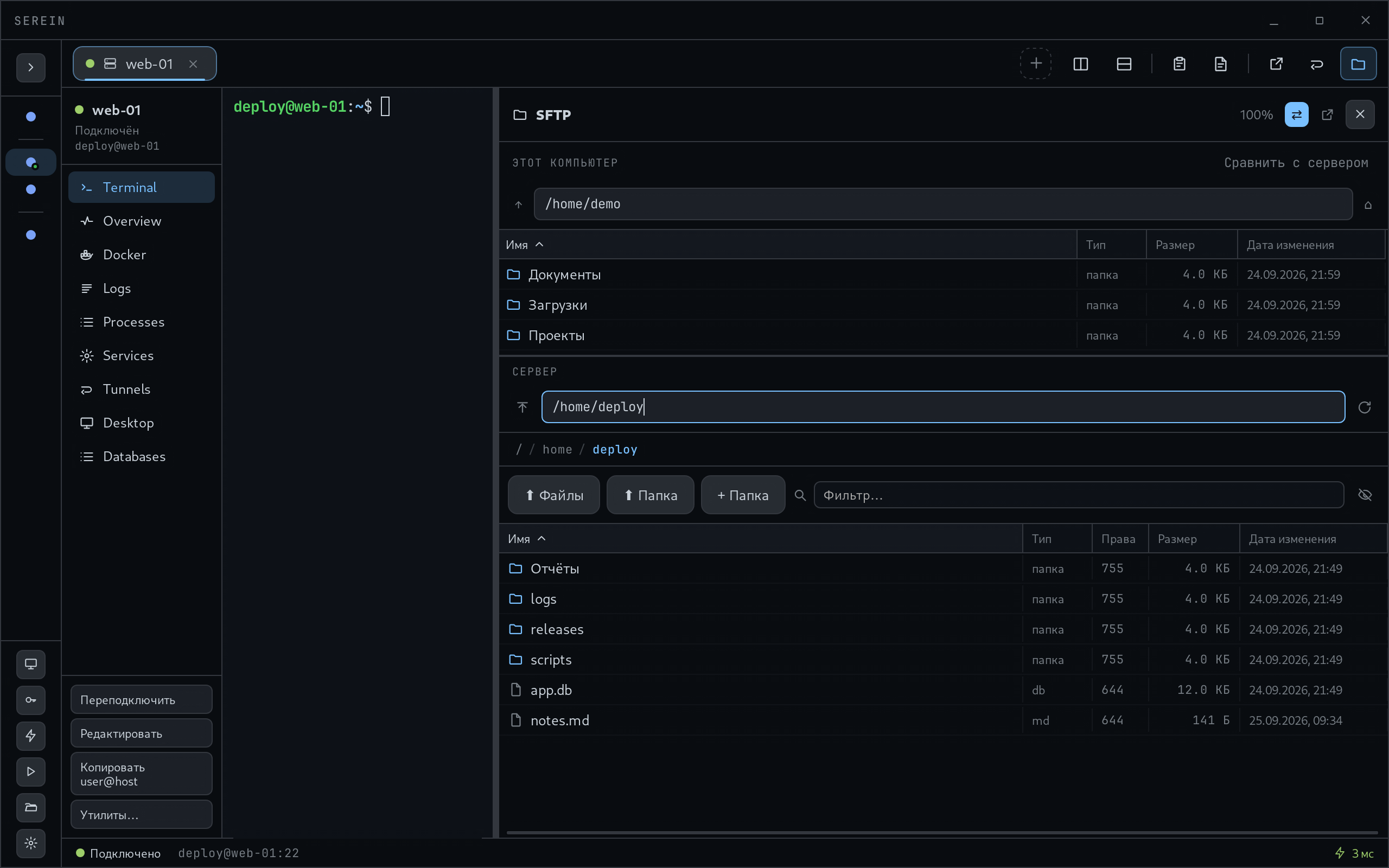
SSH · ProxyJump · ТуннелиРабота с файлами по SFTP, поддержка SCP для предусмотренных сценариев, редактирование файлов и сравнение папок.
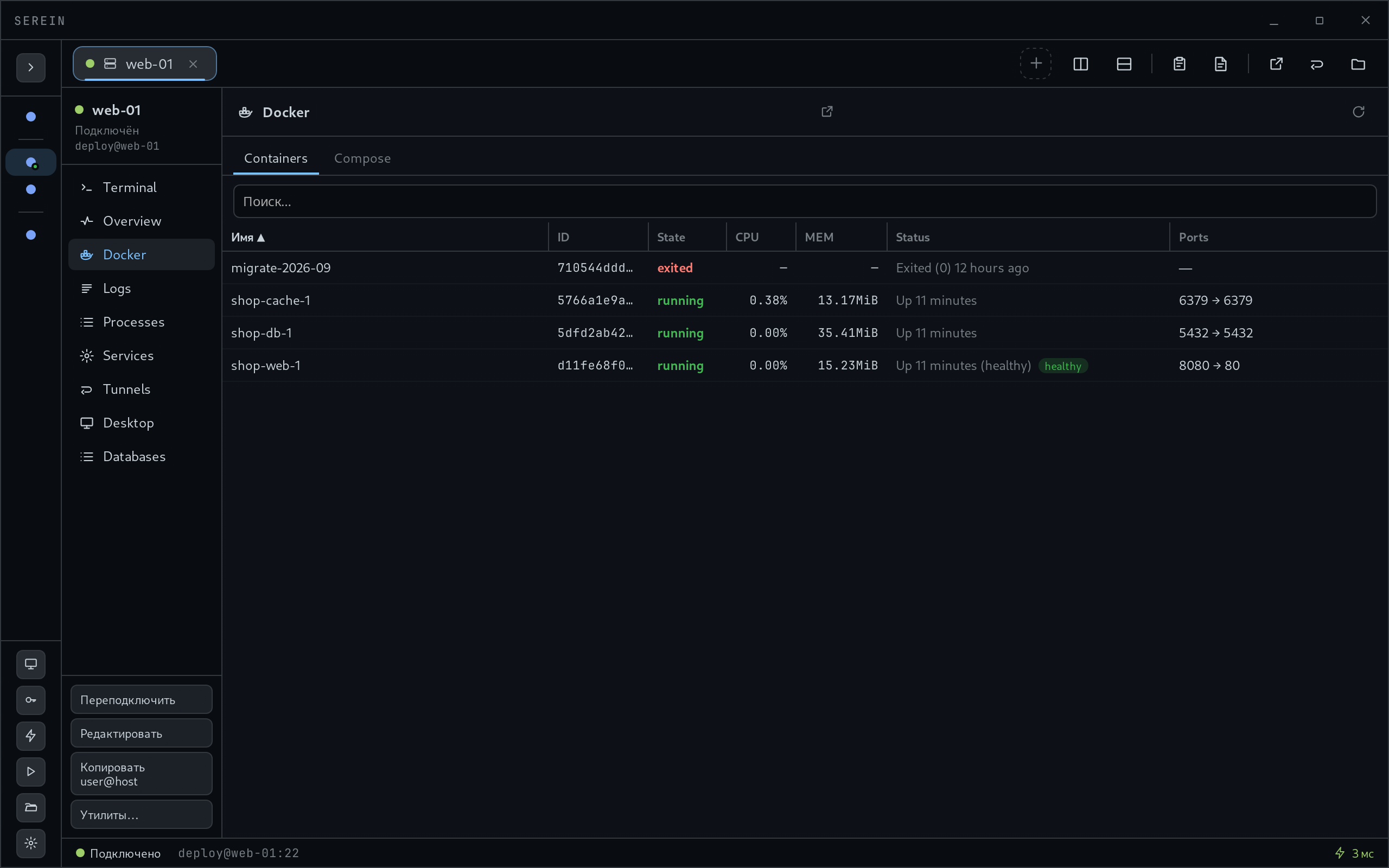
SFTP · SCP · РедакторРабота с контейнерами и Compose-проектами: запуск, остановка, перезапуск и просмотр журналов.
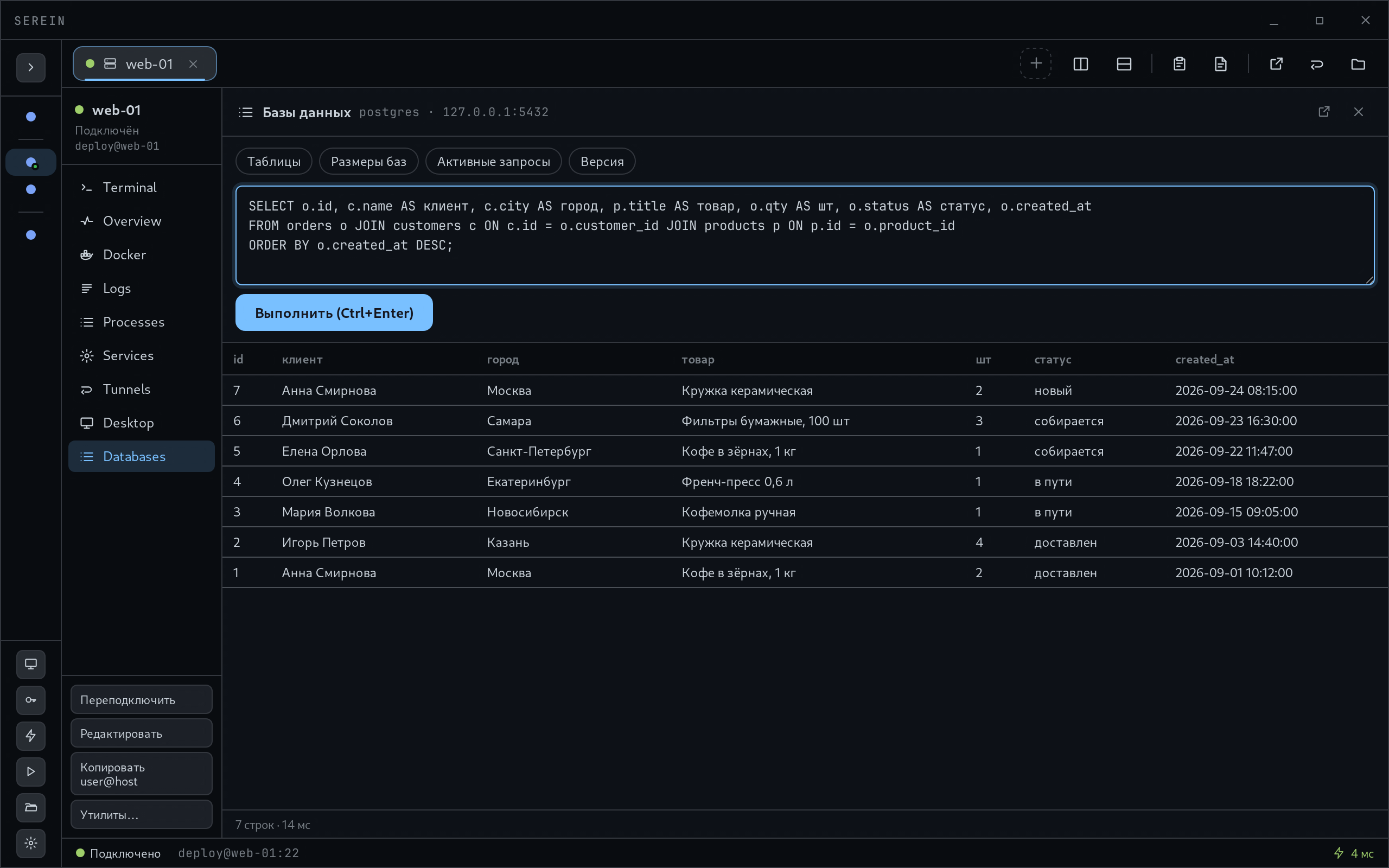
Контейнеры · Службы · ЛогиПодключения к PostgreSQL, MySQL и MariaDB, SQL Server, SQLite, MongoDB и Redis через SSH-сервер.
Запросы · РезультатыРабота с удалённым графическим окружением. Для соответствующего подключения на сервере требуется настроенная служба RDP или VNC.
Удалённое окружениеПоследовательности команд, передачи файлов и проверок. Шаги выполняются по порядку на каждом сервере; разные серверы могут обрабатываться параллельно.
Шаги · Условия · ИсторияКАК ЭТО РАБОТАЕТ
Укажите адрес сервера, учётную запись и способ входа.
При первом SSH-подключении проверьте его ключ. Изменение отпечатка останавливает соединение.
Откройте терминал, файлы или нужную панель. Операции выполняются с правами подключённой учётной записи.
Serein доступен для Windows x64 и Linux x64. Для SSH-сценариев нужен SSH-сервис; для Docker Compose, баз данных и удалённых рабочих столов — соответствующие программы и службы на сервере.
Требования и ограничения в документацииSEREIN / РЕСУРСЫ
Установщик EXE · 8,3 МиБ
Скачать для WindowsSerein_1.5.2_x64-setup.exe
40180197c48dbbab01692511d590726eef46687c84781a697689c1395fedfeb5Переносимая сборка AppImage · 103,7 МиБ
Скачать для LinuxSerein_1.5.2_amd64.AppImage
bf5a051aca42a6e9c3c9a3845c8866a786baa8c689e535b4083714daa2e5e86aЗапустите EXE и следуйте шагам установщика. Требуется Microsoft WebView2. Portable ZIP распакуйте целиком, затем запустите Serein.exe.
Скачайте AppImage кнопкой выше. Откройте терминал в папке скачанного файла.
Если появляется ошибка libfuse.so.2: Debian 13+, Ubuntu 24.04+ используют libfuse2t64; Debian 12 и Ubuntu 22.04 — libfuse2. Установите пакет для вашей версии:
sudo apt update
sudo apt install libfuse2t64
Для Debian 12 / Ubuntu 22.04 вместо последней команды:
sudo apt install libfuse2При отсутствии FUSE 2 установите пакет вместе с обычным обновлением системы:
sudo pacman -Syu fuse2chmod +x Serein_1.5.2_amd64.AppImage
./Serein_1.5.2_amd64.AppImageЗапускайте приложение от обычного пользователя. Сохраните AppImage в папке с правом записи, если используете автообновление.
./Serein_1.5.2_amd64.AppImage --appimage-extract-and-runЕсли отсутствует системная библиотека или файл не запускается, скопируйте сообщение из терминала и отправьте на hadeworks@gmail.com. Совместимость со всеми версиями дистрибутивов не гарантируется.
Документация AppImage по FUSE ↗
Для подключения нужен доступ к SSH-серверу. Docker, базы данных и RDP/VNC требуют соответствующих служб на сервере.
Дальше: первое подключениеВерсия для Windows без установщика.
Serein_1.5.2_x64-portable.zip3337ff407427cb305f08eb061202deecefe13cf897f37daf4ebddc33aecdc70cИсходники версии 1.5.2 в ZIP-архиве.
Serein-1.5.2-source.zipbf3b85fbf2b09123f5aeee9a82f70eee739f644b21adb4ec0d4c5499401ee5d3Состав зависимостей в формате CycloneDX.
serein-1.5.2-sbom-reconstructed.zip41acc60df2a33c1849633b96ea514ebc628cb5b2fa654fd611b40af68935b4a3ПРОВЕРКА ЗАГРУЗОК
Суммы SHA-256 для проверки скачанных файлов.
Выпуск исправлений, и важный: подтверждения перед необратимыми действиями не работали - DELETE без WHERE, удаление серверов и файлов, перезапись чужой правки в редакторе и остальное выполнялось без вопроса. Теперь каждое из 22 мест спрашивает «Да / Отмена» и ждёт ответа. «Выполнить на нескольких» больше не теряет мгновенные результаты, импорт ~/.ssh/config переносит ProxyJump и не дублирует серверы, панель рабочего стола находит xrdp в /usr/sbin и серверы на IPv6. Появилась инструкция пользователя со скриншотами и в PDF.
Выпуск безопасности и честности. Политика администратора проверяет каждый путь наружу: туннели (в том числе поднятые при входе), SOCKS5, базы, рабочие столы и утилиты; незнакомый тип туннеля, COM-порт в цепочке и ProxyCommand её больше не обходят. Журнал действий пишет то, что произошло: итоги загрузок по файлам, скачивание перетаскиванием, изменения сервера при настройке стола, отказы. Панель файлов не путает серверы, Docker отклоняет неверные имена вместо обрезки.
Первый корпоративный слой: журнал действий с цепочкой хешей и отправкой в syslog, политики администратора через групповые политики или защищённый файл. В задачах появились переменные, секреты (не хранятся, только спрашиваются), среды, готовые шаблоны и перенос файлом. Заливка по SFTP и SCP больше не портит файл при отмене или обрыве. Сохранённый пароль отвечает и на запрос keyboard-interactive. Сворачивание в трей.
Задачи: шаги по порядку на выбранных серверах. Все семь баз данных. Доводка Fleet, сравнение папок с заливкой только изменённого, профили рабочего пространства и разбор аудита безопасности по пунктам.
RDP: вход без второго окна, разрешение следом за окном, сеанс принадлежит SSH-соединению.
VNC и базы данных каналом внутри SSH-сессии, определение системы сервера, утилиты отдельной вкладкой.
Нашли ошибку или хотите предложить улучшение? Напишите автору. Укажите версию Serein, вашу ОС и шаги, после которых возникла проблема.
hadeworks@gmail.com ↗SEREIN / РЕСУРСЫ
Читайте онлайн или скачайте PDF.
Контакт сайта: hadeworks@gmail.com. Раздел #license содержит описание Apache License 2.0 и полный текст из LICENSE; скачать его можно по /documents/LICENSE.txt. Раздел #start описывает установку, импорт SSH config (без паролей), ручное добавление сервера и проверку отпечатка при подключении. Инструкция AppImage разделяет Debian 13+/Ubuntu 24.04+ (libfuse2t64), Debian 12/Ubuntu 22.04 (libfuse2) и Arch (pacman -Syu fuse2). Команды установки системных пакетов изменяют ОС; Arch-команда выполняет полное обновление. Приложение запускается без sudo. При недоступности FUSE указан --appimage-extract-and-run. Поддержка каждого производного дистрибутива отдельно не подтверждена.
Сайт содержит обзор из четырёх скриншотов приложения с ручным переключением и клавишами стрелок. Загрузки выделяют Windows/Linux по данным браузера; определение ОС не скрывает другие пакеты. Добавлены установка, история шести выпусков и контакт автора. Поиск работает локально по выбранному языку документации, от двух символов, показывает до 12 фрагментов. Команды копируются через Clipboard API; при отказе предлагается ручное копирование. Оглавление расположено в начале документа и прокручивается вместе с ним, не перекрывая текст. Панель выбора языка и PDF остаётся закреплённой; анимации учитывают паузу и reduced-motion.
Serein — настольный клиент для подключения к серверам и выполнения операций с терминалами, файлами, контейнерами, базами данных и удалёнными рабочими столами. Операции выполняются с правами учётной записи, указанной для подключения.
Область документа: опубликованная версия 1.5.2, локальные изменения Compose от 2026-10-22 и миграция доставки обновлений в исходном дереве от 2026-10-23. Сохранение Compose-проектов после Down и регистрация по пути YAML относятся к локальной сборке. Их наличие в распространённом пакете с номером 1.5.2 не следует определять только по номеру версии.
Платформы клиента: Windows x64 и Linux x64. Лицензия локального исходного кода: Apache 2.0. По сообщению владельца от 2026-10-22, прежний GitHub-репозиторий недоступен, https://serein-dev.xyz/ развёрнут на домашнем сервере через NPM.
Опубликованные пакеты 1.5.2 размещены в https://serein-dev.xyz/releases/1.5.2/. Манифест обновлений: https://serein-dev.xyz/updates/latest.json. На сайте доступны исходники тега v1.5.2 (коммит 00454cc14072f938b8659b282afe65ca27c7c9e7), portable ZIP, SHA256SUMS.txt и исходный список сумм прежнего выпуска. Архив serein-1.5.2-sbom-reconstructed.zip восстановлен 23.10.2026 по тегу: Rust приложения, RDP-помощник и npm; это не исходный GitHub-архив. Включённый PROVENANCE.txt описывает метод восстановления. Подписи опубликованных Windows/Linux updater-файлов проверены прежним публичным ключом приложения.
flowchart LR
    UI[React 18 / TypeScript / WebView] -->|invoke / events / channels| Core[Tauri 2 / Rust]
    Core --> Profile[Локальный профиль / секреты / журнал]
    Core -->|SSH| Server[Удалённый сервер]
    Server --> Files[Файлы / процессы / Docker Compose]
    Core -->|Каналы внутри SSH| Data[Базы данных / RDP / VNC]
    Core --> Helper[Процесс serein-rdp]
Схема показывает логические зависимости. RDP-помощник участвует в передаче данных рабочего стола; схема не описывает побайтовый маршрут кадров.
| Компонент | Ответственность и граница |
|---|---|
src/renderer |
Панели, вкладки, терминал xterm, редактор CodeMirror. Интерфейс обращается к Rust через window.api. |
src/api/index.ts, src/shared/types.ts |
Вызовы Tauri и типы сообщений. Это внутренний интерфейс приложения, не HTTP API. |
src-tauri/src/commands |
Обработчики IPC, поиск активной сессии, вызов предметных модулей, запись отдельных действий в журнал. |
src-tauri/src |
SSH, SFTP/SCP, процессы PTY, хранилище, Docker, БД, задачи, политики. |
rdp-helper |
Процесс RDP-помощника. В Windows-пакете требуется serein-rdp.exe из того же выпуска, что и основной исполняемый файл. |
| Программы на сервере | SSH-сервис обязателен для SSH-сценариев. Docker Compose, sqlite3, RDP/VNC и команды управления службами требуются соответствующим операциям. |
Сетевые соединения пользователя направляются на выбранные им адреса. В текущем исходном дереве updater использует только https://serein-dev.xyz/updates/latest.json, а ручная загрузка ведёт в https://serein-dev.xyz/#downloads. Генератор манифеста по умолчанию формирует URL https://serein-dev.xyz/releases/<version>/<asset>; SEREIN_UPDATE_BASE допускает только HTTPS. Подписи и публичный ключ не менялись. Уже выпущенные бинарные файлы 1.5.2 содержат старые адреса проверки: эти встроенные адреса меняются только при новой сборке. Для них сохранён совместимый манифест по прежнему адресу nehade.xyz/updates/terminal/latest.json; его URL файлов уже указывают на serein-dev.xyz. Новая версия программы этой миграцией не выпускалась. Режим «Закрытый контур» отключает проверки обновлений, но не блокирует подключения пользователя.
Источники: API-мост, конфигурация Tauri, модель безопасности.
| Поле / сущность | Допустимые значения и поведение |
|---|---|
ServerConfig.id / ID сессии |
ID профиля сохраняется между запусками. ID активной сессии выдаётся при подключении. В команды Docker и файлов передаётся ID сессии; наличие профиля не означает наличие соединения. |
connection |
ssh, serial, telnet, raw. Отсутствующее значение означает ssh. Telnet и raw TCP сами по себе не шифруют трафик. |
authType |
password, key, agent. Для ключа используется путь к приватному ключу. Пустой agentKey означает перебор ключей SSH-агента. |
proxyJump / proxyCommand |
proxyJump ссылается на другой сохранённый профиль и имеет приоритет над proxyCommand. proxyCommand запускает локальную программу; импорт такой записи требует проверки команды. |
executeOnConnect |
Команда отправляется после открытия сессии и может изменить состояние сервера. |
tunnels |
Сохранённые пробросы поднимаются после подключения. local открывает локальный порт к адресу со стороны сервера; remote открывает порт сервера с пересылкой на локальное назначение; dynamic создаёт SOCKS5-прокси. |
При первом SSH-подключении пользователь подтверждает ключ сервера. Изменившийся отпечаток останавливает подключение. Фоновые подключения принимают только ранее подтверждённые ключи, включая ключи шлюзов. Ошибка чтения хранилища доверенных ключей не трактуется как первое подключение.
Источники: типы, SECURITY.md.
Каталог профиля: %APPDATA%\serein на Windows, каталог конфигурации serein по правилам XDG на Linux. SEREIN_CONFIG_DIR переопределяет каталог до запуска. Один профиль открывается одним процессом. Переносная сборка без этой переменной использует профиль по умолчанию.
| Данные | Содержимое и побочный эффект |
|---|---|
servers.json, secrets.json |
Профили и защищённые секреты либо ссылки на системное хранилище. Копирование secrets.json не заменяет экспорт между компьютерами. |
settings.json, known_hosts.json |
Настройки и подтверждённые ключи серверов. Удаление доверенной записи приводит к повторной проверке сервера. |
tasks.json, workspaces.json |
Задачи и сохранённые рабочие пространства. |
docker-compose-projects.json |
Локальный реестр Compose по ID профиля сервера. Не содержит резервной копии YAML или данных контейнеров. |
| Журналы сеансов и действий | Могут содержать команды, пути и тексты запросов. При включённой отправке syslog запись передаётся на заданный адрес. |
Защита секретов: DPAPI на Windows, Secret Service через системную связку на Linux. Мастер-пароль добавляет слой scrypt и AES-256-GCM. Экспорт .tbk защищается паролем и переносит данные профиля; файлы сервера, базы данных и игровые миры в него не входят.
Политики читаются из HKLM\SOFTWARE\Policies\Serein и защищённого %ProgramData%\Serein\policy.json на Windows, /etc/serein/policy.json на Linux. Проверяется защита источника, а не только его имя. Недопустимая или незащищённая политика не применяется; ошибка отображается и записывается в журнал. Политика не является системной изоляцией процесса.
Источники: хранилище, политики, SECURITY.md.
SFTP используется при наличии подсистемы на сервере; для поддерживаемых сценариев предусмотрен SCP. Запись из редактора использует временный файл и замену целевого. Ошибка установки требуемых прав в SFTP прекращает сохранение.
У SFTP конфликт определяется по времени изменения: при ненулевых текущем и базовом mtime разница более 1000 мс возвращает {ok:false, conflict:true}. Это не сравнение содержимого. В реализации SCP base_mtime не проверяется, поэтому одинаковое обнаружение конфликта для двух транспортов не гарантируется.
Сравнение папок выбирает новые и изменённые файлы для загрузки, не удаляя лишние удалённые файлы. Отмена передачи не откатывает другие уже завершённые операции.
Источники: SFTP, SCP, файловые команды.
window.api.docker вызывает команды Rust. Параметр id означает активную SSH-сессию.
| Операция | Контракт, изменения состояния и ошибки |
|---|---|
composeList(id) |
Опрос Compose и при необходимости меток контейнеров, объединение с сохранённым реестром. Таймаут каждого опроса — 15 с. Ошибка опроса не заменяется статусом «все остановлены». Ошибка чтения или записи реестра возвращается вызывающему коду. |
composeRegister(id, composeFile) |
Принимает абсолютный POSIX-путь после удаления крайних пробелов. Управляющие символы запрещены. Выполняет docker compose -f <path> config --format json, предел ожидания 20 с. При успехе сохраняет имя и путь. Развёрнутая конфигурация с подставленными секретами не возвращается в интерфейс. Возвращаемое «Не запущен» является значением регистрации, а не отдельной проверкой состояния контейнеров. |
composeAction(id, composeFile, project, action, service?) |
action: up, down, start, stop, restart. up и down работают с проектом; остальным нужен service. Имя проекта/службы соответствует [A-Za-z0-9][A-Za-z0-9_.-]*. up требует известного абсолютного POSIX-пути и вызывает up -d. Остальные действия могут использовать имя проекта без пути. |
composeRead(id, composeFile) |
Читает первые 400 строк файла; это просмотр, не получение полного содержимого без ограничения. Неизвестный путь возвращает ошибку. |
composeLogs(...) |
Передаёт журнал выбранной службы, начиная с последних 200 строк, затем следует за новыми записями. При закрытии панели отмените поток через cancelComposeLogs и снимите подписку на события. |
Перед изменяющим действием проект сохраняется в локальный реестр. Если сохранить реестр не удалось, удалённое действие не запускается. Предел ожидания действия — 60 с. Таймаут клиента не подтверждает отсутствие изменений на сервере: перед повтором необходимо запросить состояние.
down вызывает Compose без -v: удаляет контейнеры проекта и управляемую им сеть, не запрашивает удаление томов. Данные в удаляемом записываемом слое контейнера теряются. Сохранность подключённых томов и каталогов зависит от конфигурации проекта и внешних действий. stop сохраняет контейнер. Сохранённый реестр позволяет снова показать проект после down, но не восстанавливает удалённый YAML.
Два канала ошибки обязательны к обработке: отклонённый Promise и успешный вызов с {ok:false, error}. Отсутствие сессии возвращает Сессия не подключена. Ненулевой код Compose, неверный JSON, имя или путь не считаются успехом.
Источники: API, обработчики, валидация и реестр.
Шаги задачи на одном сервере выполняются по порядку; разные серверы могут обрабатываться параллельно. Виды шага: command, upload, download, sync, service, docker, healthcheck. Условия: success, failure, always. Ошибка прекращает обычную последовательность на этом сервере, если не задано continueOnError; шаги обработки ошибки и завершения определяются условиями.
Предел шага по умолчанию — 300 с, верхний предел — 21600 с. Повторы ограничены 10; повтор изменяющего шага может повторить уже выполненный побочный эффект. Пробный прогон подключается и выполняет проверки, но не запускает пользовательские команды. Он не является исполнением или откатом. История содержит до 50 запусков; вывод шага ограничен 64 КиБ в текущем окне и 8 КиБ в истории.
Виды подключения БД: postgres, mysql (включая MariaDB), mssql, sqlite, mongo, redis. Адрес интерпретируется со стороны SSH-сервера; при отсутствии используется 127.0.0.1. Порты по умолчанию: 5432, 3306, 1433, 27017, 6379 соответственно для сетевых протоколов; SQLite использует файл и программу sqlite3 на сервере.
В db.rs заданы пределы результатов: 5000 строк, суммарно 16 МиБ учитываемых значений, 64 КиБ на ячейку, 100 наборов результатов. Это не предел всей памяти процесса. Клиентский срок запроса — 30 с; при его истечении соединение БД закрывается. Серверный предел 28 с применяется там, где поддержан протоколом. Отмена PostgreSQL пытается сохранить соединение; для остальных движков соединение закрывается. Закрытие не доказывает откат выполненного запроса.
Источники: задачи, БД, команды БД.
TODO(doc): [определить гарантии совместимости внутреннего IPC между версиями и опубликовать полный перечень контрактов с кодами ошибок. Текущие обработчики используют текстовые ошибки, а не единый каталог кодов.]
https://serein-dev.xyz/#downloads и проверьте SHA-256 по списку соответствующего выпуска. Порядок проверки указан в разделе 4.4.tauri.linux.conf.json. Для DEB требуются libwebkit2gtk-4.1-0 и libayatana-appindicator3-1. Наличие пакета не подтверждает совместимость со всеми дистрибутивами.SEREIN_CONFIG_DIR, если нужен отдельный профиль. Иначе используется каталог по умолчанию.hostname.Up проверьте путь и имя проекта.Down определите, где хранятся данные приложения: том, подключённый каталог или слой контейнера. После действия обновите список и проверьте фактическое состояние..tbk. Данные сервера резервируйте отдельно. При переносе сначала просмотрите состав импорта и разрешаемые ProxyCommand.Получите исходное дерево и установите Node ^20.19.0 || >=22.12.0, Rust 1.96.0 с rustfmt и clippy.
На Windows установите средства сборки MSVC C++ и WebView2. На Linux установите зависимости из CONTRIBUTING.md и docs/LINUX_MIGRATION.md.
Из корня проекта выполните:
npm ci
npm run typecheck
npm run lint
npm test
cargo fmt --manifest-path src-tauri/Cargo.toml --check
cargo clippy --manifest-path src-tauri/Cargo.toml --all-targets -- -D warnings
cargo test --manifest-path src-tauri/Cargo.toml --lib
Для разработки выполните npm run tauri -- dev. Адрес dev-сервера: 127.0.0.1:1420.
Для Windows выполните npm run tauri -- build; для Linux — npm run build:linux. Подпись обновлений требует настроенного ключа сборочной среды. Сборка не публикует пакет автоматически.
Источники: package.json, тулчейн, Linux-конфигурация, CONTRIBUTING.md.
Сайт https://serein-dev.xyz/ содержит разделы #home, #about, #downloads, #docs. Раздача пакетов и исходников находится в /releases/1.5.2/, манифест - /updates/latest.json. Документация читается в браузере на русском и английском; скачиваемые экспорты предоставляются в PDF. Markdown остаётся источником документов. Карточки загрузок содержат краткое назначение файлов; происхождение SBOM описано в технической документации и в PROVENANCE.txt внутри архива. Относительные ссылки на код требуют исходного дерева соответствующей версии; исходники скачиваются отдельным ZIP.
https://serein-dev.xyz/releases/1.5.2/SHA256SUMS.txt и сравните SHA-256 скачанного файла.PROVENANCE.txt. Историческая сумма старого SBOM не является суммой пересозданного архива.Windows setup и Linux AppImage не пересобирались: их байты и подписи совпадают с опубликованным выпуском. Исходники из тега не содержат локальных исправлений от 22.10.2026 и миграции endpoint от 23.10.2026. Сайт не изменяет конфигурацию установленного клиента. Настройки темы и паузы анимаций сохраняются в localStorage; недоступное хранилище не блокирует чтение и скачивание.
Файлы раздаются nginx из каталога /mnt/material/serein через read-only mount /srv/artifacts. NPM завершает TLS и проксирует serein-dev.xyz на http://serein-site:80. Для выпуска сначала размещаются подписанные файлы и суммы, затем атомарно заменяется /mnt/material/serein/updates/latest.json. Несуществующие файлы возвращают HTTP 404; latest.json отдаётся с Cache-Control: no-cache.
| Состояние | Обработка и граница гарантии |
|---|---|
| SSH-сессия отсутствует или разорвана | Восстановить соединение и повторно проверить состояние перед изменяющей операцией. Наличие ID профиля не заменяет активную сессию. |
| Отпечаток SSH изменился | Установить причину с администратором. Не удалять доверенную запись только ради обхода отказа. |
| Compose завершился по таймауту | Запросить состояние контейнеров и журнал. Не повторять изменяющую команду автоматически. |
| Реестр Compose повреждён | Сохранить копию файла для диагностики. Ошибка не означает отсутствие проектов на сервере. Не создавать пустой реестр поверх данных без восстановления состава. |
| Конфликт редактора | Сравнить локальный текст и файл сервера. При SCP отсутствует проверка base_mtime, действующая в SFTP. |
| Запрос БД обрезан или прерван | Проверить признак обрезки, ограничить запрос, при закрытом соединении подключиться заново. Не трактовать результат клиента как подтверждение отката транзакции. |
| Политика не применена | Проверить сообщение об ошибке, формат и права источника. Не считать приложение ограниченным этой политикой до подтверждения применения. |
| Отправка syslog | Поддерживаются UDP/TCP без TLS. Для недоверенного участка требуется отдельно защищённый канал или ретранслятор. |
| RDP | Доверие основано на SSH-сервере; RDP-сертификат не проверяется по системному списку доверия. Совместимость и задержки зависят от сервера и сети. |
| Компрометация учётной записи ПК | Шифрование профиля не защищает от процесса, контролирующего эту учётную запись или память запущенного клиента. |
Отдельная готовая версия macOS не подтверждена материалами этой сборки. Telnet/raw TCP не предоставляют защиту SSH. Экспорт профиля и сравнение папок не являются резервной копией сервера.
TODO(doc): [зафиксировать проверенную матрицу версий Windows, Linux-дистрибутивов, SSH-серверов, Docker Compose, СУБД и RDP/VNC.]
TODO(doc): [определить поддерживаемое число одновременных сессий и измерения производительности с указанием оборудования, сети и версии сборки.]
TODO(doc): [опубликовать проверенный порядок восстановления повреждённого профиля и реестра Compose с критериями сохранности данных.]
Website contact: hadeworks@gmail.com. The #license section describes Apache License 2.0 and includes the full LICENSE text, downloadable at /documents/LICENSE.txt. The #start section covers installation, SSH config import (without passwords), manual server entry and fingerprint verification. AppImage instructions distinguish Debian 13+/Ubuntu 24.04+ (libfuse2t64), Debian 12/Ubuntu 22.04 (libfuse2) and Arch (pacman -Syu fuse2). Package installation modifies the OS; the Arch command performs a full system upgrade. Run the application without sudo. When FUSE is unavailable, --appimage-extract-and-run is offered. Individual derivative distribution support remains unconfirmed.
The website provides four application screenshots with manual switching and arrow keys. Downloads highlight Windows/Linux using browser platform data without hiding other packages. Installation steps, six release entries and the author contact are included. Documentation search runs locally in the selected language, requires two characters and shows up to 12 snippets. Commands use the Clipboard API with manual-copy guidance on failure. The contents list stays at the start of the document and scrolls with it without covering text. The language and PDF toolbar remains sticky; animation respects pause and reduced-motion.
Serein is a desktop client for server connections and operations involving terminals, files, containers, databases and remote desktops. Operations use the permissions of the account selected for the connection.
Scope: published version 1.5.2, local Compose changes dated 2026-10-22, and the source-tree update-delivery migration dated 2026-10-23. Retaining Compose projects after Down and registering a YAML path belong to the local build. Their presence in a distributed package labelled 1.5.2 must not be inferred from the version number alone.
Client platforms: Windows x64 and Linux x64. Local source licence: Apache 2.0. As reported by the owner on 2026-10-22, the former GitHub repository is unavailable and https://serein-dev.xyz/ is deployed on the home server through NPM.
Published 1.5.2 packages are hosted at https://serein-dev.xyz/releases/1.5.2/. The update manifest is https://serein-dev.xyz/updates/latest.json. Downloads include source tag v1.5.2 (commit 00454cc14072f938b8659b282afe65ca27c7c9e7), the portable ZIP, SHA256SUMS.txt and the original release checksum list. The serein-1.5.2-sbom-reconstructed.zip archive was reconstructed on 23 October 2026 from the tag: application Rust, RDP helper and npm; it is not the original GitHub archive. Included PROVENANCE.txt describes reconstruction. Published Windows/Linux updater artifacts were verified with the application's unchanged public key.
flowchart LR
    UI[React 18 / TypeScript / WebView] -->|invoke / events / channels| Core[Tauri 2 / Rust]
    Core --> Profile[Local profile / secrets / log]
    Core -->|SSH| Server[Remote server]
    Server --> Files[Files / processes / Docker Compose]
    Core -->|Channels inside SSH| Data[Databases / RDP / VNC]
    Core --> Helper[serein-rdp process]
The diagram shows logical dependencies. The RDP helper participates in desktop transport; the diagram does not specify the byte-level frame path.
| Component | Responsibility and boundary |
|---|---|
src/renderer |
Panels, tabs, xterm terminal and CodeMirror editor. The UI calls Rust through window.api. |
src/api/index.ts, src/shared/types.ts |
Tauri calls and message types. This is an internal application interface, not an HTTP API. |
src-tauri/src/commands |
IPC handlers, active-session lookup, domain module calls and logging of selected actions. |
src-tauri/src |
SSH, SFTP/SCP, PTY processes, storage, Docker, databases, tasks and policies. |
rdp-helper |
RDP helper process. A Windows package requires serein-rdp.exe from the same release as the main executable. |
| Server-side programs | SSH service is required for SSH workflows. Docker Compose, sqlite3, RDP/VNC and service management commands are required by the respective operations. |
User-initiated connections target user-selected addresses. The current source tree configures only https://serein-dev.xyz/updates/latest.json; manual downloads point to https://serein-dev.xyz/#downloads. The manifest generator defaults to https://serein-dev.xyz/releases/<version>/<asset>; SEREIN_UPDATE_BASE requires HTTPS. Signatures and the public key are unchanged. Previously published 1.5.2 binaries embed the old check endpoints; changing those embedded endpoints requires a new build. A compatible manifest remains at nehade.xyz/updates/terminal/latest.json for those binaries, with artifact URLs already pointing to serein-dev.xyz. This migration does not publish a new application version. Offline mode disables update checks, not user-initiated connections.
Sources: API bridge, Tauri configuration, security model.
| Field / entity | Accepted values and behaviour |
|---|---|
ServerConfig.id / session ID |
A profile ID persists across application runs. An active session ID is issued on connection. Docker and file commands receive a session ID; a saved profile does not imply an active connection. |
connection |
ssh, serial, telnet, raw. An omitted value means ssh. Telnet and raw TCP do not encrypt traffic themselves. |
authType |
password, key, agent. Key authentication uses a private key path. An empty agentKey means trying SSH-agent keys in sequence. |
proxyJump / proxyCommand |
proxyJump references another saved profile and takes precedence over proxyCommand. proxyCommand starts a local program; an imported entry requires command review. |
executeOnConnect |
Sends a command after the session opens. The command can change server state. |
tunnels |
Saved forwards start after connection. local opens a local port to a destination reachable from the server; remote opens a server port forwarding to a local destination; dynamic provides a SOCKS5 proxy. |
On first SSH connection, the user confirms the server key. A changed fingerprint stops the connection. Background connections accept only previously confirmed keys, including jump-host keys. Failure to read the trust store is not treated as first contact.
Sources: types, SECURITY.md.
Profile location: %APPDATA%\serein on Windows and the serein configuration directory under XDG rules on Linux. SEREIN_CONFIG_DIR overrides this location before startup. One process opens a given profile. A portable build uses the default profile unless this variable is set.
| Data | Contents and side effects |
|---|---|
servers.json, secrets.json |
Profiles and protected secrets or references to the OS secret store. Copying secrets.json does not replace cross-computer export. |
settings.json, known_hosts.json |
Settings and confirmed server keys. Removing a trusted entry causes the server to require verification again. |
tasks.json, workspaces.json |
Tasks and saved workspaces. |
docker-compose-projects.json |
Local Compose registry keyed by server profile ID. It contains no YAML or container data backup. |
| Session and action logs | May contain commands, paths and query text. With syslog forwarding enabled, an entry is sent to the configured destination. |
Secret protection uses Windows DPAPI or Linux Secret Service through the system keyring. A master password adds scrypt and AES-256-GCM protection. Password-protected .tbk export transfers profile data; server files, databases and game worlds are excluded.
Policies are loaded from HKLM\SOFTWARE\Policies\Serein and a protected %ProgramData%\Serein\policy.json on Windows, or /etc/serein/policy.json on Linux. Source protection is checked in addition to its location. An invalid or unprotected policy is not applied; an error is displayed and logged. A policy is not OS-level process isolation.
Sources: storage, policies, SECURITY.md.
SFTP is used when the server subsystem is available; supported workflows have an SCP fallback. Editor saves write a temporary file and replace the target. Failure to set the required SFTP file permissions aborts the save.
SFTP conflict detection uses modification time: if current and base mtime are nonzero and differ by more than 1000 ms, the result is {ok:false, conflict:true}. This is not content comparison. The SCP implementation does not check base_mtime; equivalent conflict detection across both transports is not guaranteed.
Folder comparison selects new and changed files for upload without deleting extra remote files. Cancelling a transfer does not roll back other completed operations.
Sources: SFTP, SCP, file commands.
window.api.docker invokes Rust commands. The id parameter identifies an active SSH session.
| Operation | Contract, state changes and errors |
|---|---|
composeList(id) |
Queries Compose and, when needed, container labels, then merges results with the saved registry. Each discovery query has a 15 s timeout. Discovery failure is not converted to an all-stopped state. Registry read/write errors reach the caller. |
composeRegister(id, composeFile) |
Accepts an absolute POSIX path after trimming surrounding whitespace. Control characters are rejected. Runs docker compose -f <path> config --format json with a 20 s wait limit. On success, saves the project name and path. Expanded configuration containing substituted secrets is not returned to the UI. The returned Не запущен status is a registration value, not an independent container-state check. |
composeAction(id, composeFile, project, action, service?) |
action: up, down, start, stop, restart. up and down target a project; the other actions require service. Project/service names match [A-Za-z0-9][A-Za-z0-9_.-]*. up requires a known absolute POSIX path and runs up -d. Other actions can use a project name without a path. |
composeRead(id, composeFile) |
Reads the first 400 lines. This is a preview, not an unbounded full-file read. An unknown path returns an error. |
composeLogs(...) |
Streams the selected service log, starting with the last 200 lines and following new entries. Cancel the stream through cancelComposeLogs and remove the event subscription when the panel closes. |
Before a state-changing action, the project is saved to the local registry. If registry persistence fails, the remote action is not started. The action wait limit is 60 s. A client timeout does not prove that the server remained unchanged; query its state before retrying.
down invokes Compose without -v: it removes project containers and its managed network without requesting volume removal. Data in the removed container writable layer is lost. Retention of mounted volumes and directories depends on project configuration and external actions. stop retains the container. The saved registry can list a project after down, but cannot restore a deleted YAML file.
Callers must handle both error channels: a rejected Promise and a resolved call containing {ok:false, error}. A missing session returns Сессия не подключена. Nonzero Compose exit status, invalid JSON, an invalid name or an invalid path are not success.
Sources: API, handlers, validation and registry.
Task steps run sequentially on each server; different servers can run in parallel. Step kinds: command, upload, download, sync, service, docker, healthcheck. Conditions: success, failure, always. An error stops the normal sequence on that server unless continueOnError is set; error-handling and finalisation steps depend on their conditions.
The default step limit is 300 s; the maximum is 21600 s. Retries are limited to 10; retrying a state-changing step can repeat an already completed side effect. A dry run connects and performs checks but does not execute user commands. It is neither execution nor rollback. History retains up to 50 runs; step output is limited to 64 KiB in the current view and 8 KiB in history.
Database connection kinds: postgres, mysql (including MariaDB), mssql, sqlite, mongo, redis. Hostnames are interpreted from the SSH server; the default is 127.0.0.1. Default network ports are 5432, 3306, 1433, 27017 and 6379 respectively; SQLite uses a file and the server-side sqlite3 program.
db.rs defines result limits of 5000 rows, 16 MiB of accounted values, 64 KiB per cell and 100 result sets. These do not bound the entire process memory. The client query deadline is 30 s; reaching it closes the database connection. A 28 s server limit is applied where supported by the protocol. PostgreSQL cancellation attempts to retain the connection; other engines close it. Closure does not prove query rollback.
Sources: tasks, databases, database commands.
TODO(doc): [define internal IPC compatibility guarantees between versions and publish the complete contract list with error codes. Current handlers use textual errors rather than a shared code catalogue.]
https://serein-dev.xyz/#downloads and verify its SHA-256 against the corresponding release checksum list. See section 4.4 for verification steps.tauri.linux.conf.json. The DEB requires libwebkit2gtk-4.1-0 and libayatana-appindicator3-1. Package existence does not establish compatibility with every distribution.SEREIN_CONFIG_DIR before first launch if a separate profile is required. Otherwise the default directory is used.hostname can be used without changing server state.Up.Down, identify whether application data resides in a volume, a bind-mounted directory or the container writable layer. Refresh the list and verify actual state afterwards..tbk file. Back up server data separately. During migration, preview import contents and permitted ProxyCommand entries first.Obtain the source tree and install Node ^20.19.0 || >=22.12.0 and Rust 1.96.0 with rustfmt and clippy.
On Windows, install MSVC C++ build tools and WebView2. On Linux, install dependencies listed in CONTRIBUTING.md and docs/LINUX_MIGRATION.md.
Run from the project root:
npm ci
npm run typecheck
npm run lint
npm test
cargo fmt --manifest-path src-tauri/Cargo.toml --check
cargo clippy --manifest-path src-tauri/Cargo.toml --all-targets -- -D warnings
cargo test --manifest-path src-tauri/Cargo.toml --lib
Run npm run tauri -- dev for development. The development server uses 127.0.0.1:1420.
Run npm run tauri -- build for Windows or npm run build:linux for Linux. Update signing requires a configured build-environment key. Building does not publish a package automatically.
Sources: package.json, toolchain, Linux configuration, CONTRIBUTING.md.
The https://serein-dev.xyz/ website contains #home, #about, #downloads and #docs sections. Packages and source archives are served under /releases/1.5.2/; the manifest is at /updates/latest.json. Documentation can be read in the browser in Russian and English; downloadable exports are PDF. Markdown remains the document source. Download cards contain short file descriptions; SBOM provenance is documented in the technical documentation and in PROVENANCE.txt inside the archive. Relative code links require the corresponding source tree, available as a separate ZIP.
https://serein-dev.xyz/releases/1.5.2/SHA256SUMS.txt and compare the downloaded file's SHA-256.PROVENANCE.txt. The historical SBOM checksum does not apply to the reconstructed archive.Windows setup and Linux AppImage were not rebuilt: bytes and signatures match the published release. Tagged sources do not include local changes dated 22 October 2026 or the endpoint migration dated 23 October 2026. The website does not modify an installed client's configuration. Theme and animation-pause preferences use localStorage; unavailable storage does not block reading or downloading.
Nginx serves files from /mnt/material/serein through the read-only /srv/artifacts mount. NPM terminates TLS and proxies serein-dev.xyz to http://serein-site:80. Publish signed artifacts and checksums first, then atomically replace /mnt/material/serein/updates/latest.json. Missing files return HTTP 404; latest.json uses Cache-Control: no-cache.
| Condition | Handling and guarantee boundary |
|---|---|
| SSH session absent or disconnected | Reconnect and inspect current state before a modifying operation. A profile ID does not replace an active session. |
| SSH fingerprint changed | Establish the cause with the administrator. Do not remove trust solely to bypass rejection. |
| Compose timed out | Query container state and logs. Do not automatically retry a modifying command. |
| Compose registry damaged | Preserve a copy for diagnosis. An error does not establish that the server has no projects. Do not overwrite it with an empty registry without recovering its contents. |
| Editor conflict | Compare local text and the server file. SCP lacks the base_mtime check used by SFTP. |
| Database result truncated or interrupted | Inspect truncation status, constrain the query and reconnect if the connection closed. Do not treat client status as confirmation of transaction rollback. |
| Policy not applied | Check the error, format and source permissions. Do not assume the application is restricted by that policy until application is confirmed. |
| Syslog forwarding | UDP/TCP are supported without TLS. An untrusted segment requires a separately protected channel or relay. |
| RDP | Trust relies on the SSH server; the RDP certificate is not validated against the OS trust store. Compatibility and latency depend on server and network conditions. |
| Compromised PC account | Profile encryption does not protect against a process controlling that account or the running client's memory. |
A separate macOS release is not confirmed by this build's materials. Telnet/raw TCP do not provide SSH protection. Profile export and folder comparison are not server backups.
TODO(doc): [record a verified version matrix for Windows, Linux distributions, SSH servers, Docker Compose, database engines and RDP/VNC.]
TODO(doc): [define supported concurrent session counts and performance measurements with hardware, network and build version specified.]
TODO(doc): [publish a verified recovery procedure for a damaged profile and Compose registry, including data-retention criteria.]
Serein распространяется под лицензией Apache License 2.0. Она разрешает использование, в том числе коммерческое, изменение и распространение при соблюдении её условий.
При распространении сохраняйте текст лицензии и применимые уведомления об авторских правах; изменённые файлы необходимо помечать. Условия сторонних компонентов указаны в их лицензиях. Программа предоставляется без гарантий в пределах, установленных лицензией.
Скачать лицензию Apache License
Version 2.0, January 2004
http://www.apache.org/licenses/
TERMS AND CONDITIONS FOR USE, REPRODUCTION, AND DISTRIBUTION
1. Definitions.
"License" shall mean the terms and conditions for use, reproduction,
and distribution as defined by Sections 1 through 9 of this document.
"Licensor" shall mean the copyright owner or entity authorized by
the copyright owner that is granting the License.
"Legal Entity" shall mean the union of the acting entity and all
other entities that control, are controlled by, or are under common
control with that entity. For the purposes of this definition,
"control" means (i) the power, direct or indirect, to cause the
direction or management of such entity, whether by contract or
otherwise, or (ii) ownership of fifty percent (50%) or more of the
outstanding shares, or (iii) beneficial ownership of such entity.
"You" (or "Your") shall mean an individual or Legal Entity
exercising permissions granted by this License.
"Source" form shall mean the preferred form for making modifications,
including but not limited to software source code, documentation
source, and configuration files.
"Object" form shall mean any form resulting from mechanical
transformation or translation of a Source form, including but
not limited to compiled object code, generated documentation,
and conversions to other media types.
"Work" shall mean the work of authorship, whether in Source or
Object form, made available under the License, as indicated by a
copyright notice that is included in or attached to the work
(an example is provided in the Appendix below).
"Derivative Works" shall mean any work, whether in Source or Object
form, that is based on (or derived from) the Work and for which the
editorial revisions, annotations, elaborations, or other modifications
represent, as a whole, an original work of authorship. For the purposes
of this License, Derivative Works shall not include works that remain
separable from, or merely link (or bind by name) to the interfaces of,
the Work and Derivative Works thereof.
"Contribution" shall mean any work of authorship, including
the original version of the Work and any modifications or additions
to that Work or Derivative Works thereof, that is intentionally
submitted to Licensor for inclusion in the Work by the copyright owner
or by an individual or Legal Entity authorized to submit on behalf of
the copyright owner. For the purposes of this definition, "submitted"
means any form of electronic, verbal, or written communication sent
to the Licensor or its representatives, including but not limited to
communication on electronic mailing lists, source code control systems,
and issue tracking systems that are managed by, or on behalf of, the
Licensor for the purpose of discussing and improving the Work, but
excluding communication that is conspicuously marked or otherwise
designated in writing by the copyright owner as "Not a Contribution."
"Contributor" shall mean Licensor and any individual or Legal Entity
on behalf of whom a Contribution has been received by Licensor and
subsequently incorporated within the Work.
2. Grant of Copyright License. Subject to the terms and conditions of
this License, each Contributor hereby grants to You a perpetual,
worldwide, non-exclusive, no-charge, royalty-free, irrevocable
copyright license to reproduce, prepare Derivative Works of,
publicly display, publicly perform, sublicense, and distribute the
Work and such Derivative Works in Source or Object form.
3. Grant of Patent License. Subject to the terms and conditions of
this License, each Contributor hereby grants to You a perpetual,
worldwide, non-exclusive, no-charge, royalty-free, irrevocable
(except as stated in this section) patent license to make, have made,
use, offer to sell, sell, import, and otherwise transfer the Work,
where such license applies only to those patent claims licensable
by such Contributor that are necessarily infringed by their
Contribution(s) alone or by combination of their Contribution(s)
with the Work to which such Contribution(s) was submitted. If You
institute patent litigation against any entity (including a
cross-claim or counterclaim in a lawsuit) alleging that the Work
or a Contribution incorporated within the Work constitutes direct
or contributory patent infringement, then any patent licenses
granted to You under this License for that Work shall terminate
as of the date such litigation is filed.
4. Redistribution. You may reproduce and distribute copies of the
Work or Derivative Works thereof in any medium, with or without
modifications, and in Source or Object form, provided that You
meet the following conditions:
(a) You must give any other recipients of the Work or
Derivative Works a copy of this License; and
(b) You must cause any modified files to carry prominent notices
stating that You changed the files; and
(c) You must retain, in the Source form of any Derivative Works
that You distribute, all copyright, patent, trademark, and
attribution notices from the Source form of the Work,
excluding those notices that do not pertain to any part of
the Derivative Works; and
(d) If the Work includes a "NOTICE" text file as part of its
distribution, then any Derivative Works that You distribute must
include a readable copy of the attribution notices contained
within such NOTICE file, excluding those notices that do not
pertain to any part of the Derivative Works, in at least one
of the following places: within a NOTICE text file distributed
as part of the Derivative Works; within the Source form or
documentation, if provided along with the Derivative Works; or,
within a display generated by the Derivative Works, if and
wherever such third-party notices normally appear. The contents
of the NOTICE file are for informational purposes only and
do not modify the License. You may add Your own attribution
notices within Derivative Works that You distribute, alongside
or as an addendum to the NOTICE text from the Work, provided
that such additional attribution notices cannot be construed
as modifying the License.
You may add Your own copyright statement to Your modifications and
may provide additional or different license terms and conditions
for use, reproduction, or distribution of Your modifications, or
for any such Derivative Works as a whole, provided Your use,
reproduction, and distribution of the Work otherwise complies with
the conditions stated in this License.
5. Submission of Contributions. Unless You explicitly state otherwise,
any Contribution intentionally submitted for inclusion in the Work
by You to the Licensor shall be under the terms and conditions of
this License, without any additional terms or conditions.
Notwithstanding the above, nothing herein shall supersede or modify
the terms of any separate license agreement you may have executed
with Licensor regarding such Contributions.
6. Trademarks. This License does not grant permission to use the trade
names, trademarks, service marks, or product names of the Licensor,
except as required for reasonable and customary use in describing the
origin of the Work and reproducing the content of the NOTICE file.
7. Disclaimer of Warranty. Unless required by applicable law or
agreed to in writing, Licensor provides the Work (and each
Contributor provides its Contributions) on an "AS IS" BASIS,
WITHOUT WARRANTIES OR CONDITIONS OF ANY KIND, either express or
implied, including, without limitation, any warranties or conditions
of TITLE, NON-INFRINGEMENT, MERCHANTABILITY, or FITNESS FOR A
PARTICULAR PURPOSE. You are solely responsible for determining the
appropriateness of using or redistributing the Work and assume any
risks associated with Your exercise of permissions under this License.
8. Limitation of Liability. In no event and under no legal theory,
whether in tort (including negligence), contract, or otherwise,
unless required by applicable law (such as deliberate and grossly
negligent acts) or agreed to in writing, shall any Contributor be
liable to You for damages, including any direct, indirect, special,
incidental, or consequential damages of any character arising as a
result of this License or out of the use or inability to use the
Work (including but not limited to damages for loss of goodwill,
work stoppage, computer failure or malfunction, or any and all
other commercial damages or losses), even if such Contributor
has been advised of the possibility of such damages.
9. Accepting Warranty or Additional Liability. While redistributing
the Work or Derivative Works thereof, You may choose to offer,
and charge a fee for, acceptance of support, warranty, indemnity,
or other liability obligations and/or rights consistent with this
License. However, in accepting such obligations, You may act only
on Your own behalf and on Your sole responsibility, not on behalf
of any other Contributor, and only if You agree to indemnify,
defend, and hold each Contributor harmless for any liability
incurred by, or claims asserted against, such Contributor by reason
of your accepting any such warranty or additional liability.
END OF TERMS AND CONDITIONS
APPENDIX: How to apply the Apache License to your work.
To apply the Apache License to your work, attach the following
boilerplate notice, with the fields enclosed by brackets "[]"
replaced with your own identifying information. (Don't include
the brackets!) The text should be enclosed in the appropriate
comment syntax for the file format. We also recommend that a
file or class name and description of purpose be included on the
same "printed page" as the copyright notice for easier
identification within third-party archives.
Copyright 2026 HaDe
Licensed under the Apache License, Version 2.0 (the "License");
you may not use this file except in compliance with the License.
You may obtain a copy of the License at
http://www.apache.org/licenses/LICENSE-2.0
Unless required by applicable law or agreed to in writing, software
distributed under the License is distributed on an "AS IS" BASIS,
WITHOUT WARRANTIES OR CONDITIONS OF ANY KIND, either express or implied.
See the License for the specific language governing permissions and
limitations under the License.
В загрузках выберите Windows или Linux. Для Windows запустите EXE; инструкции AppImage для Debian/Ubuntu и Arch приведены ниже на странице загрузок.
В меню импорта выберите SSH config и файл ~/.ssh/config. Serein перенесёт адреса, пользователей, порты, пути к ключам и поддерживаемые шлюзы. Пароли при импорте не переносятся.
Если готового списка нет, нажмите + над списком серверов и укажите адрес, порт SSH (обычно 22), пользователя и способ входа.
Выберите сервер. При первом подключении сравните отпечаток SSH-ключа с данными администратора, затем подтвердите доверие. Введите пароль или укажите доступный на этом компьютере файл ключа.
Начните с терминала, перейдите к файлам или выберите Docker и Databases. Для этих операций на сервере должны быть настроены соответствующие службы и права.